
Antes de nada, abra Microsoft Outlook 2003, y a continuación empezaremos con la configuración.
Paso 1
Localice la barra de menús en la ventana. En ella podrá ver los botones de "Archivo", "Editar", "Ver", etcétera.
Para abrir las herramientas de las cuentas de correo, siga estos pasos:
- Click en Herramientas
- Click en la opción Cuentas
- Añadir una nueva cuenta de correo
Captura de pantalla 1

Paso 2
Selecciona la opción "Post Office Protocol 3" (POP3) y haga click en siguiente.
Captura de pantalla 2

Paso 3
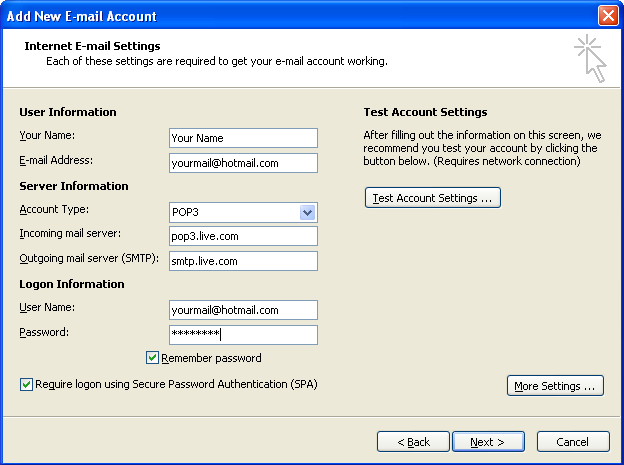
- Ahora debe introducir en el formulario la siguiente información.
- Su Nombre: Su nombre.
- Dirección de Correo Electrónico: La dirección de correo que se le ha dado.
- Servidor de Correo entrante POP3: mail.tudominio.com
- Servidor de Correo Saliente SMTP: mail.tudominio.com
- Nombre de usuario: La dirección de correo que se le ha dado.
- Contraseña: Su contraseña.
Ahora, haga click en "Más configuraciones".
Captura de pantalla 3

Paso 4
Vaya a la pestaña "General" y rellene los campos con su información.
- Cuenta de correo: Aquí debe introducir un nombre para reconocer su cuenta de correo, por ejemplo "Trabajo" o "Personal"
- Compañia: El nombre de su empresa.
- Correo electrónico de respuesta: Su dirección de correo.
Captura de pantalla 4

Paso 5
Vaya a la pestaña "Servidor de salida" y rellene los campos con su información.
Marque "Mi servidor de salida (SMTP) requiere autenticación"
Asegurese de que la casilla "Utilizar la misma configuración que mi servidor de correo de entrada" está marcada también.
Captura de pantalla 5

Paso 6
Finalmente, vaya a la pestaña "Avanzadas" y asegurese de que la opción "Dejar una copia de los mensajes en el servidor" no esté marcada, o en caso contrario su cuenta de correo se llenará muy rapido y dejará de recibir correos.
Captura de pantalla 6

Configuración completada
Con esto concluye la configuración de su cuenta de correo en Outlook 2003.
Captura de pantalla 7

Paso 7
Por ultimo, para comprobar que todo está funcionando correctamente, pruebe a enviar un correo a su propia cuenta. Así, si no hay ningún problema, usted deberá recibir un correo de si mismo en su bandeja de entrada.